Array Flatten in JavaScript
Introduction:
Imagine opening a box and finding another box inside it.
Then another.
And another.
That is exactly what nested arrays look like in JavaScript.
const data = [1, [2, [3, [4]]]];
At first glance, nested arrays seem simple. But in real applications, deeply nested data structures quickly become difficult to work with.
This is where array flattening becomes important.
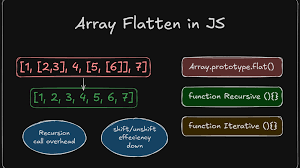
Flattening means converting nested arrays into a single-level array.
[1, [2, [3]]] → [1, 2, 3]
If you're learning JavaScript, preparing for coding interviews, working with APIs, or handling complex data structures, understanding array flattening is an essential skill.
In this guide, you’ll learn:
What nested arrays are
Why flattening matters
Multiple ways to flatten arrays
Interview-friendly problem-solving techniques
Common mistakes beginners make
Performance considerations
Real-world applications
Let’s start from the fundamentals.
What Are Nested Arrays in JavaScript?
A nested array is simply an array inside another array.
Simple Example:
const numbers = [1, 2, [3, 4]];
Here:
1and2are normal elements[3, 4]is another array inside the main array
Deeply Nested Array Example:
const data = [1, [2, [3, [4, [5]]]]];
Visualization:
[
1,
[
2,
[
3,
[
4,
[5]
]
]
]
]
This structure is common in:
API responses
Tree data
Menu systems
File structures
Comment threads
JSON data
Why Flattening Arrays Is Useful:
Flattening arrays helps simplify data processing.
Instead of dealing with complicated nested structures, you get a clean, single-level array.
Real-World Example
Suppose an e-commerce API returns categories like this:
const categories = [
["Electronics", "Mobiles"],
["Fashion", ["Men", "Women"]],
["Home"]
];
Flattening makes the data easier to:
Search
Filter
Sort
Display in UI
Store in databases
Flattened version:
[
"Electronics",
"Mobiles",
"Fashion",
"Men",
"Women",
"Home"
]
Understanding the Concept of Flattening:
Think of flattening like compressing multiple floors of a building into one floor.
Nested arrays have “levels.”
Flattening removes those levels.
Before Flattening:
[1, [2, [3, 4]]]
Structure:
Level 1 → 1
Level 2 → [2]
Level 3 → [3, 4]
After Flattening:
[1, 2, 3, 4]
Now everything exists at the same level.
Method 1: Using flat() (Modern JavaScript):
The easiest and cleanest way is using the built-in flat() method.
Syntax:
array.flat(depth)
depthspecifies how deep the flattening should go.
Example 1: Flatten One Level
const arr = [1, 2, [3, 4]];
console.log(arr.flat());
Output:
[1, 2, 3, 4]
Example 2: Flatten Multiple Levels:
const arr = [1, [2, [3, [4]]]];
console.log(arr.flat(3));
Output:
[1, 2, 3, 4]
Example 3: Completely Flatten an Array:
const arr = [1, [2, [3, [4, [5]]]]];
console.log(arr.flat(Infinity));
Output
[1, 2, 3, 4, 5]
Why Developers Love flat()
Advantages:
Simple syntax
Readable
Built into JavaScript
Great for most projects
Disadvantages:
Not supported in very old browsers
Less control over custom behavior
Method 2: Flatten Using Recursion:
Recursion is one of the most important concepts in programming interviews.
Many companies ask developers to flatten arrays manually without using flat().
What Is Recursion?
Recursion means a function calling itself.
A recursive solution works perfectly because nested arrays naturally have recursive structures.
Recursive Flatten Function:
function flattenArray(arr) {
let result = [];
for (let item of arr) {
if (Array.isArray(item)) {
result = result.concat(flattenArray(item));
} else {
result.push(item);
}
}
return result;
}
Usage:
const data = [1, [2, [3, [4]]]];
console.log(flattenArray(data));
Output:
[1, 2, 3, 4]
Step-by-Step Thinking Process:
This is the most important part for interviews.
Input:
[1, [2, [3]]]
Step 1:
Take 1
It is not an array
Add it to result "result = [1]"
Step 2
Take [2, [3]]
It IS an array
Call function again
Step 3
Inside recursive call:
Take 2
result = [2]
Then process [3]
Step 4
Again recursive call:
result = [3]
Final Combined Result:
[1, 2, 3]
Method 3: Using reduce()
This is popular among experienced JavaScript developers.
Example:
function flatten(arr) {
return arr.reduce((acc, item) => {
return acc.concat(
Array.isArray(item)
? flatten(item)
: item
);
}, []);
}
Why Use reduce()?
Advantages
Functional programming style
Compact code
Powerful for transformations
Disadvantages
Harder for beginners
Less readable initially
Method 4: Flatten Using Loops
Sometimes interviews restrict recursion.
In such cases, iterative approaches become useful.
Example Using Stack
function flatten(arr) {
const stack = [...arr];
const result = [];
while (stack.length) {
const next = stack.pop();
if (Array.isArray(next)) {
stack.push(...next);
} else {
result.push(next);
}
}
return result.reverse();
}
Why This Approach Matters
This demonstrates understanding of:
Stacks
Iteration
Algorithmic thinking
Memory handling
Interviewers often appreciate this.
Comparing Different Flattening Approaches:
| Method | Easy to Learn | Performance | Interview Friendly | Modern |
|---|---|---|---|---|
flat() |
Excellent | Good | Medium | Yes |
| Recursion | Medium | Good | Excellent | Yes |
reduce() |
Medium | Good | Good | Yes |
| Loop + Stack | Harder | Very Good | Excellent | Yes |
Common Interview Scenarios
Array flattening is one of the most common JavaScript interview topics.
Scenario 1: Flatten Without flat():
Companies may ask:
“Implement your own flatten function.”
This tests:
Problem-solving
Recursion knowledge
Array manipulation skills
Scenario 2: Flatten Only Specific Depth:
Example:
flat(arr, 2)
You must flatten only 2 levels.
Scenario 3: Preserve Certain Elements:
Sometimes objects should remain untouched.
Example:
[1, {a:1}, [2]]
Output:
[1, {a:1}, 2]
Beginner Mistakes to Avoid:
Mistake 1: Forgetting Base Conditions
Bad recursion can cause infinite loops.
Mistake 2: Modifying Original Array
Avoid mutating input arrays unnecessarily.
Mistake 3: Using concat() Excessively
Too many concatenations can impact performance.
Mistake 4: Ignoring Deep Nesting
Some solutions fail with deeply nested arrays.
Always test edge cases.
Pro Tips for Developers
Pro Tip 1: Use flat(Infinity) Carefully
It works well but may be slower for extremely large arrays.
Pro Tip 2: Understand Recursion Deeply
Recursion appears everywhere:
Trees
File systems
DOM traversal
Graph algorithms
Mastering flattening helps with advanced topics later.
Pro Tip 3: Think Like an Interviewer
Interviewers care more about:
Your reasoning
Edge case handling
Clarity of explanation
Not just the final code.
Real-World Applications of Array Flattening
Flattening is used heavily in modern software development.
Frontend Development
Frameworks like:
React
Vue.js
Angular
often process nested component data.
API Data Processing
REST APIs and GraphQL responses may contain deeply nested arrays.
Flattening simplifies rendering and filtering.
Data Analytics
Analytics tools flatten data before processing reports and charts.
E-Commerce Platforms
Online stores flatten product categories, tags, and recommendation systems.
Performance Considerations
Performance matters for large datasets.
Time Complexity
Most flattening methods operate around:
O(n)
Where n is the total number of elements.
Memory Usage
Recursive solutions use additional call stack memory.
Very deep arrays can cause:
Maximum call stack size exceeded.
Diagram: